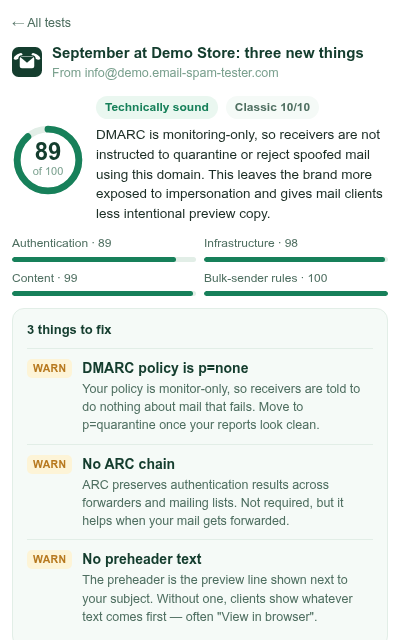
Testing an email usually takes three tabs: the draft, the tester, and whatever you send with. The extension takes one of them away. The address is in the toolbar, you can close the popup while you send, and a notification says when the report is in.
How it works
- Click the Email Spam Tester icon and press Get a test address. Tick the box under it if you also want to see which folder the email lands in at different providers.
- Copy the address and send your draft to it from the mailbox or platform you really use. Half of the checks read what that platform adds to the message, so a copy sent from somewhere else would tell you about somewhere else.
- Close the popup if you like. When the email has been checked, Chrome shows a notification with the score, and the icon carries it as a badge until you look. The notification opens the full report on this site; the popup shows it too.
The report opens in the popup: the score out of 100, the checks that failed or warned, a fix plan with DNS records you can copy, and, if you asked for it, inbox, promotions or spam at each provider. Copy what to fix puts the findings on the clipboard as plain text, ready for a ticket or for whoever writes your emails. The full report with every check and the RFC behind it is one click further, on this site.
What it keeps
Your last 20 tests stay in the browser (the address, the subject, the score), so you can reopen a report from the popup later, and a cross next to each removes it. The extension talks to email-spam-tester.com and nowhere else, has no analytics, and cannot read your mailbox, your drafts or the pages you visit. It asks Chrome for storage, alarms and notifications, and nothing more. The details are in the privacy policy.
Somewhere other than Chrome
The same test runs on this site in any browser, inside ChatGPT through the ChatGPT plugin, and from scripts through the API.